Worgle - Alive Word Challenge1.5
Publisher Description

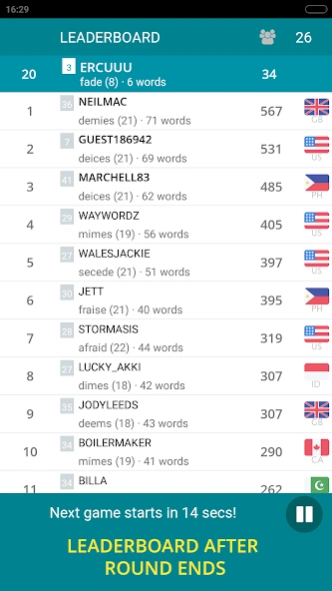


Real-time word battles! Find words, boost brain power, compete globally.
Worgle: Ultimate Word Search Puzzle - Multiplayer Brain Game
🏆 #1 Real-Time Multiplayer Word Finder Challenge - Word Puzzle Game!
Tired of waiting your turn in multiplayer word games? 🤬 Worgle throws you into the action with real-time, live competition! 💥
📱 Compete globally in this addictive, fast-paced multiplayer word search game!
🧠 Exercise your brain with this educational word puzzle adventure
🔍 Find hidden words on a 4x4 letter grid in this unique word board game
🌍 Battle word masters worldwide in real-time multiplayer matches
⏱️ Race against the clock in timed rounds for the highest word score
📊 Climb global leaderboards and track your word game progress
Why Choose Worgle - The Best Word Puzzle Game?
Instant word finding action: No waiting for turns – always your move!
Vocabulary builder: Expand your word power with in-game dictionary
Innovative gameplay: Rotate the letter board for a fresh word hunt perspective
Multilingual word puzzles: Play in English, German, French, Italian, Spanish, or Turkish
Family-friendly word game: Multiple profiles for shared devices
Top Word Game Features
✅ Real-time word competition with live multiplayer leaderboards
✅ 100-200 words per puzzle game – endless word search replayability
✅ Daily, weekly, monthly, and all-time word master rankings
✅ Detailed word gamer profiles and word finding statistics
✅ Compatible with all Android phones and tablets - play anywhere!
🧠 Challenge your mind, improve your vocabulary, and enjoy this free word puzzle game!
Download Worgle now and join millions in the global word-finding frenzy!
Perfect for fans of crossword puzzles, word search games, and brain training apps.
About Worgle - Alive Word Challenge
The company that develops Worgle - Alive Word Challenge is ALTUGA. The latest version released by its developer is 1.5. This app was rated by 1 users of our site and has an average rating of 3.0.
To install Worgle - Alive Word Challenge on your Android device, just click the green Continue To App button above to start the installation process. The app is listed on our website since 2024-08-29 and was downloaded 139 times. We have already checked if the download link is safe, however for your own protection we recommend that you scan the downloaded app with your antivirus. Your antivirus may detect the Worgle - Alive Word Challenge as malware as malware if the download link to com.ercu.wordfind is broken.
How to install Worgle - Alive Word Challenge on your Android device:
- Click on the Continue To App button on our website. This will redirect you to Google Play.
- Once the Worgle - Alive Word Challenge is shown in the Google Play listing of your Android device, you can start its download and installation. Tap on the Install button located below the search bar and to the right of the app icon.
- A pop-up window with the permissions required by Worgle - Alive Word Challenge will be shown. Click on Accept to continue the process.
- Worgle - Alive Word Challenge will be downloaded onto your device, displaying a progress. Once the download completes, the installation will start and you'll get a notification after the installation is finished.
Program Details
System requirements
Download information
Pricing
Version History
version 1.5
posted on 2024-08-29
Fixes for new Android versions
version 1.3.8
posted on 2021-07-01
version 1.15
posted on 2020-09-11
fix errors & smaller size
version 1.14
posted on 2017-12-24
fix FC errors
version 1.8
posted on 2013-12-08
- Multiple account support,- Multiple language support (german, french, italian, spanish, turkish),- many bugfixes & screens polished
version 1.7.3
posted on 2013-02-13
Several fixes and updates
